
The morning after an invoice due date is one of the most uncomfortable moments in freelancing. You check your bank account, see no payment, and face a frustrating question.
Do you follow up immediately and risk sounding aggressive? Or do you wait and risk signaling that your deadlines are optional?
A late fee can support a documented collections process, but timing and enforceability depend on the agreement and applicable law. Treat the schedule below as an operational example, not a universal legal rule.
If you want consistent payments, you need a structured system that rewards on-time payment and enforces consequences when deadlines are ignored.
Due Date vs. Late Fee Date
In a professional invoicing workflow, these are two separate milestones.
Understanding the difference allows you to enforce your terms without escalating unnecessarily.
The Due Date
The due date is the contractual deadline for payment. Whether your terms are Net 15, Net 30, or Due on Receipt, this is the date the money should arrive in your account.
If you need clarity on how to structure payment timelines correctly, review your payment terms before the project begins. Ambiguity at the start creates friction at the end. See Invoice Payment Terms Explained.
The Late Fee Date
The late fee date is when the financial penalty is applied.
Most experienced freelancers do not apply a penalty at 12:01 AM the morning after the due date. Instead, they implement a short grace period combined with a clear escalation sequence.
This protects relationships while preserving authority.
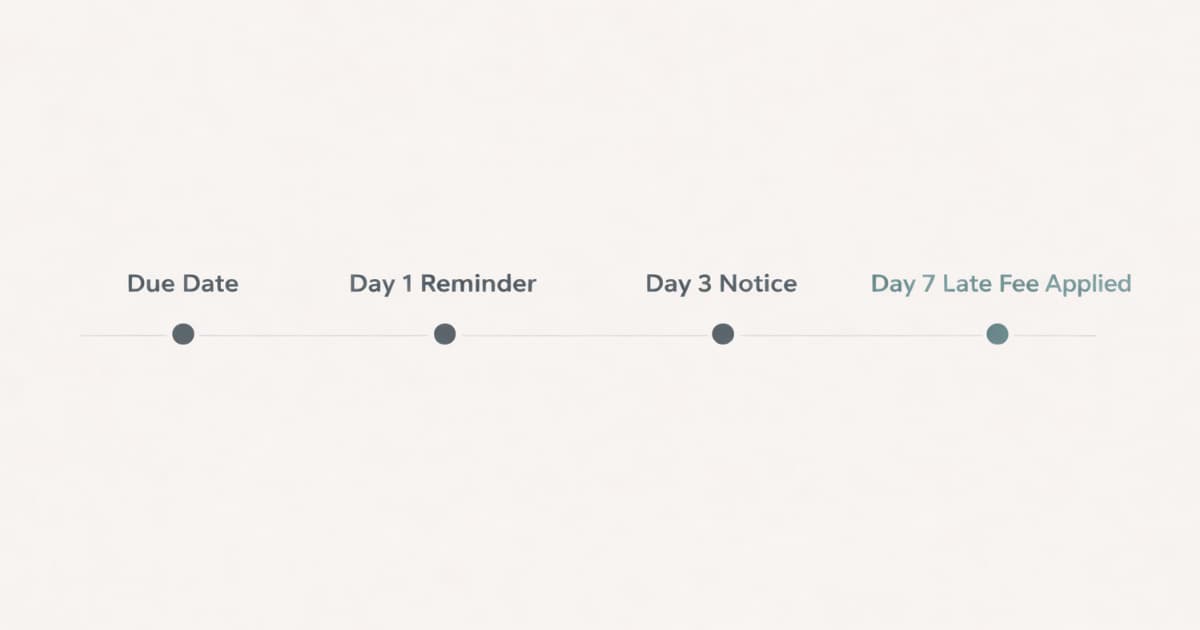
The Recommended 7-Day Grace Structure
For most B2B relationships, a 3 to 7-day grace period provides the right balance between professionalism and enforcement.
Day 1: The Polite Reminder
Send a neutral follow-up the day after the due date.
"Hi [Name], just checking whether Invoice #123 has been processed or if you need any additional details."
This is a status check, not a demand. Many delays at this stage are administrative.
Day 3: The Formal Notice
If you still have no confirmation, notify the client of the specific date when an already-agreed late fee will apply. This example uses Day 7, but your contract and local rules may require a different approach.
At this point, you are shifting from courtesy to policy.
Day 7: Apply the Late Fee
If payment has not been received and no valid explanation has been provided, apply the late fee according to your agreement.
Consistency is critical. If you do not enforce your rules, your clients will not respect them.
Why Waiting Too Long Hurts Your Business
Many freelancers wait two to four weeks before mentioning penalties because they want to preserve goodwill. In practice, this often produces the opposite effect.
When you ignore your own late fee policy, you are training the client to pay you last.
If a client must prioritize vendors during a tight month, they will pay the one who enforces terms first. Vendors who appear flexible about deadlines often become optional in the payment queue.
Late payments are common in freelancing. The difference between a stable business and one constantly chasing cash is enforcement discipline.
What You Must Have Before Charging a Late Fee
Do not introduce a penalty retroactively or assume that invoice wording alone makes it enforceable. Before charging a fee, confirm the agreement and the law that applies to the transaction.
1. A Written Agreement
Your contract should clearly state the late-fee structure and comply with applicable rules. As one jurisdiction-specific example, the UK publishes statutory interest rules for some late business-to-business payments; those rules are not a global template. (GOV.UK late commercial payments guidance)
Do not invent penalties after the work is complete.
2. Clear Invoice Terms
Each invoice should display:
- The due date
- The late fee percentage or flat fee
- The date the fee will apply
There should be no ambiguity when the client opens the invoice.
3. A Record of Follow-Ups
Documentation protects you. You should have a clear log of reminders sent and dates contacted.
If a client continues ignoring communication despite this record, you may need to move into a more formal escalation process. See Client Won't Pay? An Escalation Plan for Freelancers.
How to Apply Fees Without Damaging the Relationship
Late fees do not require emotional confrontation. They require neutral enforcement.
Instead of writing:
"I am charging you a late fee."
Use procedural language:
"Invoice #123 is now 7 days past due. Per our agreement, the late fee has been applied. Please refer to the updated invoice to avoid additional accrual."
This removes emotion and frames the situation as a policy being followed, not a conflict being initiated.
Clients respect clarity more than they respect flexibility.
If you want a deeper look at the pros and cons of late fees and what actually works, see Should Freelancers Charge Late Fees?.
Automate your payment reminders.
BillerBear sends reminders on the due date, 3 days overdue, and 10 days overdue. Add late fees manually as a line item when needed.
Create a free invoice →Automate the Enforcement
The hardest part of charging late fees is not the math. It is the psychological friction of sending the message.
Automation removes that friction.
When reminders and late fee notices are system-driven, they feel procedural rather than personal. The client understands it is part of your workflow, not a reaction.
If your current invoicing system relies on manual tracking and memory, enforcement will always feel inconsistent.
Stop Guessing and Start Enforcing
When a client pays late, they are effectively using your business as an interest-free loan.
A structured grace period with consistent enforcement protects your revenue and reinforces professional boundaries.
Set the rule. Communicate it clearly. Apply it consistently.
If your invoicing workflow does not handle reminders automatically, it may be time to strengthen the structure behind your billing process so you can focus on the work instead of chasing payments.
Ready to create clearer invoices?
Create up to 3 invoices per month free. No credit card required.
BillerBear Editorial
Continue reading
Client Says They Paid Your Invoice but You Haven't Received It: What to Do Next
When a client insists they've paid but your bank shows nothing, don't argue and don't mark it paid. Here's a verification-first workflow to diagnose the gap and resolve it.
How to Set Up an Invoice Payment Plan That Protects Your Cash Flow
When a client can't pay the full invoice at once, a structured payment plan can recover the revenue. Here's how to decide when a plan makes sense, what to put in writing, and how to invoice each installment.
Net 60 Payment Terms? How to Negotiate Faster Payment as a Freelancer
When a corporate client sends a vendor agreement with Net 45 or Net 60, you don't have to accept it as-is. Counter-offers, scripts, and what AP teams sometimes accept.