

The project was scoped. The price was agreed. Work was underway.
Then the client sent a message: "Hey, can we also add a testimonials section? And maybe swap the contact form for a booking widget?"
You said yes. You did the work. Three weeks later, the client questioned the invoice. They didn't remember approving the extra cost. You didn't have anything in writing.
This is the gap a freelance change order fills. Not scope creep scripts. Not contract clauses. The actual mid-project document that turns "can you also add..." into approved, billable work with a paper trail.
What a Change Order Is (and Isn't)
A change order is a short written agreement that documents a scope change after the original project has started. It defines what's being added or modified, how much it costs, and how it affects the timeline.
A change order usually does not replace your original contract. Once approved, it becomes an amendment or addendum that modifies a specific part of the existing agreement. Follow any change-approval process already defined in your contract or statement of work.
When You Need a Change Order vs. a Quick Line-Item Add
Not every client request needs a formal change order. The right tool depends on the size and risk of the change.
There is no universal dollar or percentage threshold. As a practical rule, use a formal change order whenever the request materially affects the project price, timeline, dependencies, or deliverables. The categories below are guidelines, not standards.
Email approval or lightweight change authorization:
- The change is minor and low-risk, with no meaningful effect on other deliverables or the delivery date
- You're billing hourly and the client understands time = cost
- The additional work is clearly an extension of an existing deliverable
Even for a small addition, confirm the work, estimated cost, and any timeline impact before starting. The email approval becomes your supporting record when you add the invoice line item. For scripts and conversation strategies, see Scope Creep: How to Bill for "Just One Small Change".
Formal change order (recommended):
- The change affects a flat-rate or milestone-based project
- The added work is substantial (e.g., $500+ depending on your rates and project size)
- The change shifts the timeline or affects other deliverables
- The project involves multiple stakeholders or an AP department
- You've already had one "small" scope expansion on this project
Revised SOW or broader contract amendment:
- The scope shift is so large it changes the nature of the project
- A significant portion of the original deliverables (e.g., 25-30% or more) are being replaced or restructured
- The original quote or SOW no longer reflects the actual work
A change order handles one modification without reopening the whole agreement. If the request substantially changes the nature of the project, create a revised statement of work or broader contract amendment rather than stacking multiple change orders onto an agreement that no longer reflects the actual project.
What to Include in a Freelance Change Order
Most freelance change orders can fit on one page. Include these eight elements:
- Change order number (CO-001, CO-002, etc., assigned sequentially and tied to the project reference)
- Project name and original SOW or contract reference
- Description of the change (what's being added, removed, or modified)
- Cost of the change (flat fee or estimated hours at your rate)
- Revised project total (original total + change amount = new total)
- Timeline impact (additional days/weeks, revised delivery date)
- Payment terms for the change (due on next invoice, separate invoice, or added to a milestone)
- Approval line (client name, date, written confirmation)
Here's what a completed freelance change order looks like. You can copy it and replace the project details with your own.
Change Order CO-001
Project: Acme Website Redesign
Reference: SOW dated July 10, 2026
Date: August 3, 2026
Requested change: Add a testimonials section containing up to six client-approved testimonials. This includes the section design, responsive development, and integration into the existing homepage.
Impact:
- Change in project price: +$750
- Original project total: $4,000
- Revised project total: $4,750
- Timeline extension: 3 business days
- Revised delivery date: August 21, 2026
- All other approved deliverables remain unchanged
Payment: The $750 change will be added as a separate line item on the next milestone invoice, due Net 14.
Approval: Please reply: "I approve Change Order CO-001 for $750 and the revised delivery date of August 21, 2026." Work on this change will not begin until written approval is received.
For hourly work: Replace the fixed change amount with an estimate such as: "Up to 5 hours at $150/hour, not to exceed $750 without additional written approval."
If you number your change orders sequentially (CO-001, CO-002), each one creates a clear audit trail you can reference on invoices. For numbering conventions, see Invoice Numbering Best Practices.
Once the client approves the change, add the CO number as a separate invoice line item so the charge can be traced back to the approval. Create and send the invoice with BillerBear.
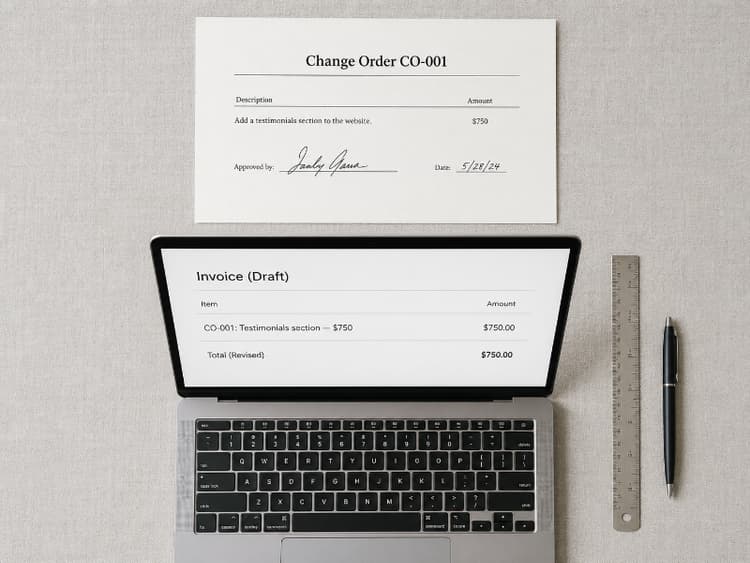
Add change orders to your invoice in seconds.
BillerBear lets you add a new line item, reference the CO number, and send a clean PDF.
Create a free invoice →How to Invoice a Change Order
Once the change order is approved, you have three options for billing it. The right choice depends on your project structure.
Option 1: Add a Line Item to the Next Invoice
Best for smaller changes on projects with milestone billing. Add a clearly labeled line item that references the change order number.
Example line item: CO-001: Testimonials section (design + development): $750
This keeps billing consolidated and simple. For line-item formatting, see How to Create a Professional Invoice.
Option 2: Issue a Separate Invoice
Best for larger changes, projects with strict AP processes, or when the change has its own payment terms. This is common with corporate clients where each budget approval needs a separate document.
Reference the change order number in the invoice description so both sides can trace it back.
Option 3: Adjust a Future Milestone
Best for milestone-billed projects where the change affects the scope of an upcoming phase. Update the milestone amount and note the change order that justifies the increase.
Whichever option you choose, the key rule: the invoice should reference the change order number. When a client's finance team sees "CO-001" on both the approval email and the invoice, the charge is easy to verify and hard to challenge.
When the Client Says "Just Do It, We'll Figure It Out Later"
This is the moment that creates unpaid invoices.
The client wants the work done now. They don't want to slow down for paperwork. They'll "sort out the billing later."
Two responses that protect you:
For trusted, long-term clients: Send a brief email summarizing the change, the cost, and the timeline impact. Ask them to reply confirming the change amount and revised delivery date before you start. This takes two minutes and creates a written record.
For new clients or large changes: Send the formal change order template. Explain that you need written approval before billing extra scope. Many clients respect this once they understand it prevents billing surprises.
What you should never do: start the work without any written confirmation of the added cost. Verbal approvals are easy to forget or reinterpret once the invoice arrives.
If the client refuses to approve the change but still expects the work, that's a red flag worth paying attention to.
Change Orders Prevent Disputes
If a client questions a line item later, CO-001 on the approval email and the invoice should match. That chain matters most at project closeout, when you reconcile deposits, milestones, and approved changes against the original contract total. Without those records, closeout turns into a negotiation.
If a dispute still happens despite documentation, see What to Do When a Client Disputes Your Invoice.
Frequently Asked Questions
Is an email approval enough for a change order?
Email approval may be sufficient if the original agreement allows it. If the contract requires a signature or a specific approval process, follow that process. Requirements can vary by contract and jurisdiction. Either way, a clear email that confirms the change number, cost, and revised delivery date creates a useful record.
Does a change order need a signature?
A separate signature is not always required, but the approval method should follow the original agreement and any client procurement requirements. For high-value projects or clients with strict procurement processes, a formal countersignature may be worth requesting.
Can a change order reduce the project price?
Yes. If the client removes deliverables or simplifies the scope, document the reduction with the same process. Include the revised total so both sides have a clear record of the new agreement.
Should a change order get its own invoice?
It depends on the size and your billing structure. Small changes can be added as a line item on the next scheduled invoice. Larger changes, or changes with separate payment terms, often work better as their own invoice. See the three invoicing options earlier in this article.
Document the Change. Then Invoice It.
The work isn't the hard part. Getting paid for extra scope is, unless you have approval on record before you start.
Write the change order, get a written yes, and put the change order number—such as CO-001—on the invoice. Reconcile those records at closeout so the final total matches what both sides agreed to.
Once the client approves the change, create a clean invoice in BillerBear, add CO-001 to the line-item description, and send a professional PDF with the supporting reference clearly documented.
Ready to create clearer invoices?
Create up to 3 invoices per month free. No credit card required.
BillerBear Editorial
Continue reading
Freelance Project Closeout Checklist: Final Invoice, Handoff, and Records
Don't let the final invoice slip after a project wraps. Use this freelance closeout checklist to reconcile deposits, send the last invoice, document the handoff, and close your records.
Freelance Client Onboarding Checklist: What to Lock Down Before the First Invoice
Most payment problems start before the project does. Use this freelance client onboarding checklist so your first invoice lands with the right person and the right terms.
5 Client Red Flags That Predict Payment Problems
Learn the five early warning signs during client onboarding that predict late payments and unpaid invoices. Protect your freelance cash flow before the project starts.