
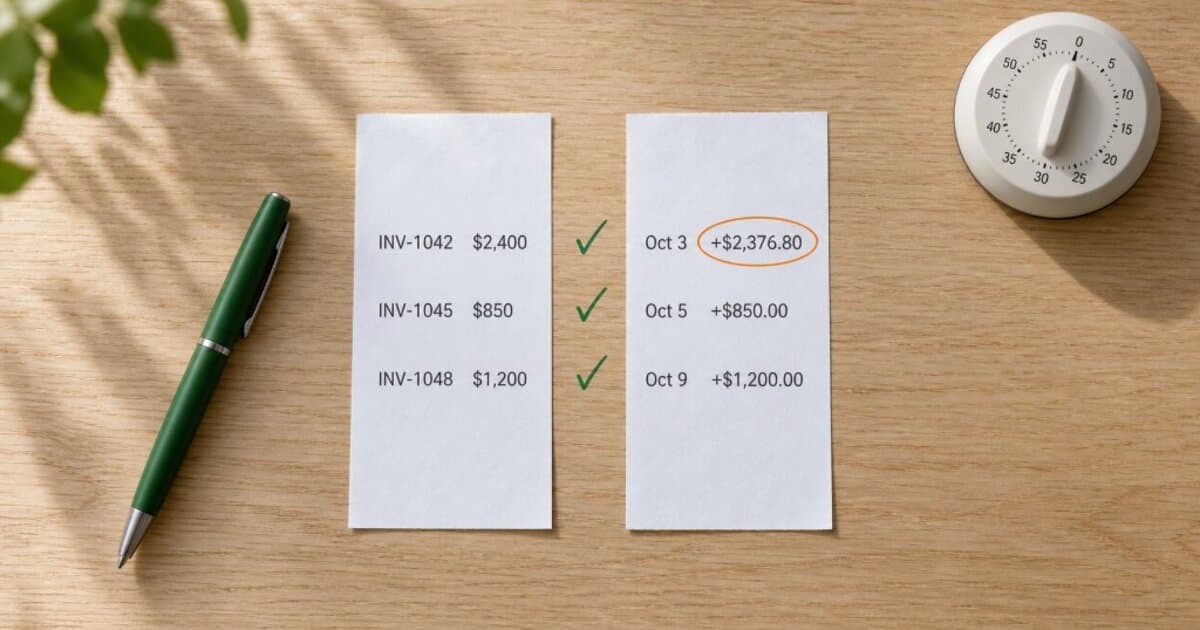
You invoiced $8,200 last quarter. Your bank shows $7,940 in deposits. Where's the other $260?
Probably PayPal fees, a Stripe payout you never split out, and one client who paid two invoices in a single transfer. "Probably" isn't enough when your CPA asks for clean records in February.
That gap between what you billed and what hit your account is where freelancers lose hours, miss deductions, or both. AR tracking tells you what's still outstanding. Tax prep gets records ready for filing. Neither one answers the question in between: did the money you already received actually match what you invoiced?
That's invoice reconciliation. Skip it during the year, and tax season is when you find out.
What Invoice Reconciliation Means for Freelancers
Invoice reconciliation means matching three records that should agree but often don't:
- Your invoices: what you billed, at what amounts, to whom
- Your payment records: what you marked as paid (fully or partially) in your invoicing tool or spreadsheet
- Your bank deposits: what actually arrived in your account
When all three match, your records are clean. When they don't, you have a mismatch to investigate before it becomes a tax error, a client dispute, or lost income.
This is different from accounts receivable tracking, which focuses on unpaid invoices and aging buckets. Reconciliation picks up where AR leaves off: once an invoice is marked paid, did the deposit actually show up? See Accounts Receivable for Freelancers for the unpaid side of the ledger.
It's also different from annual tax prep, which covers the full sweep of organizing records for your CPA. Reconciliation is the ongoing habit that makes tax prep take hours instead of days. See The Freelancer Tax Prep Checklist for the annual routine.
Why the Numbers Don't Match (and Why That's Normal)
Before you panic about a gap, know that mismatches between invoiced amounts and bank deposits are common. They're usually explainable. The problem is when nobody investigates them.
Here are the most frequent causes:
Processing fees. You invoiced $1,000. After Stripe's processing fee, about $970 landed in your bank. For a typical U.S. Schedule C business, the gross customer payment is generally included in gross receipts, while ordinary and necessary payment-processing fees can generally be deducted as a separate business expense. The deposit alone won't show both sides of that transaction.
U.S. note: Tax examples in this guide refer to U.S. federal rules. Reporting and recordkeeping requirements vary by country and business structure.
Batched payouts. Stripe and PayPal can combine multiple client payments into one bank deposit. A $3,400 deposit might cover three separate invoices. Without matching each piece, you have three paid invoices and one mystery deposit.
Partial payments. The client paid $2,000 of a $3,500 invoice. You recorded it. Did $2,000 land, or did roughly $1,940 land after fees? See Partial Payments on Invoices for how to track splits properly.
Currency conversion. You invoiced €2,000. Your bank shows $2,147. Both numbers can be correct. For reconciliation, use the exchange rate and conversion details shown by your bank or payment processor. For U.S. tax reporting, taxpayers whose functional currency is the U.S. dollar generally translate foreign-currency income at the rate prevailing when the income is received or accrued, depending on their accounting method. See How to Invoice International Clients for multi-currency practices.
Reimbursements mixed with fees. A client reimbursed you $300 for stock photos and paid your $2,000 invoice in one transfer. Your bank shows $2,300 against a $2,000 invoice. See How to Invoice Reimbursable Expenses for keeping these separate.
Timing differences. You marked an invoice paid on the 28th, but the deposit cleared on the 2nd of the next month. End-of-month reconciliation flags this until the deposit posts.
Reversed payments. A chargeback or ACH return pulls money back after you recorded the payment. Your records say paid. Your bank says otherwise. See Client Chargeback? A Freelancer's Guide to Payment Reversals for next steps.
None of these are crises. All of them are problems when you catch them twelve months later.
The 3-Column Check
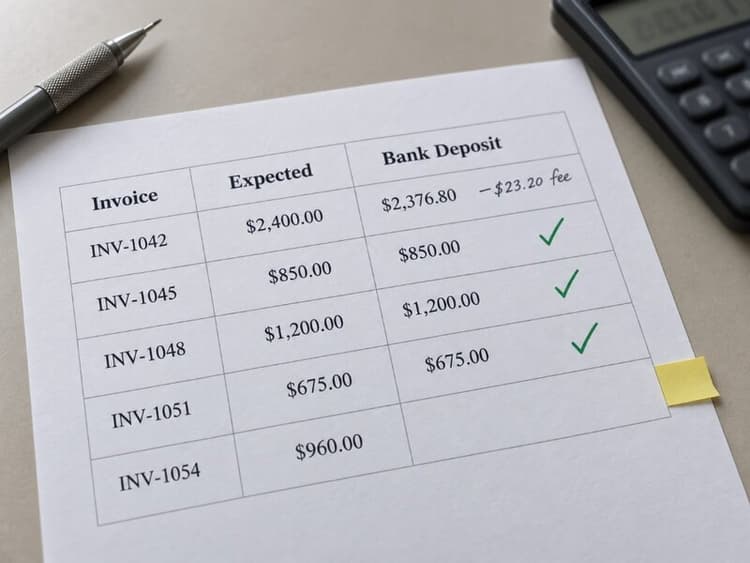
The simplest reconciliation method is a three-column comparison. Use a spreadsheet, a notebook, or your invoicing tool's payment history.
For each invoice marked paid during the period:
| Column 1: Invoice | Column 2: Payment Record | Column 3: Bank Deposit |
|---|---|---|
| Invoice #, client, gross amount | Date marked paid, amount recorded, payment method | Deposit date, net amount received, source/reference |
Go through each paid invoice and match it to a bank deposit. For each row, check:
- Does the recorded payment amount match the deposit (after fees)?
- Does the payment date align with the deposit according to your processor's expected payout schedule?
- Is every deposit accounted for by an invoice?
Any row where the three columns don't reconcile gets flagged.
The Monthly Reconciliation Workflow
For a freelancer with modest invoice volume, this can take less than 30 minutes once the process becomes routine. Run it at month-end, or quarterly if your volume is low.
Step 1: Pull your lists (3 minutes)
Open three things:
- Your invoicing tool or spreadsheet, filtered to invoices marked paid this month
- Your bank statement or transaction export for the same month
- Your payment processor dashboard(s) if you use Stripe, PayPal, or Wise
Step 2: Match deposits to invoices (10 minutes)
Work through bank deposits one by one. For each deposit:
- Find the corresponding invoice(s)
- Confirm amounts match (gross invoice minus fees = net deposit)
- Check off both the invoice and the deposit
If one deposit covers multiple invoices (common with Stripe batch payouts), break it into components and match each one.
Step 3: Flag exceptions (5 minutes)
After matching, you'll have three types of leftovers:
Unmatched deposits: Money in your bank with no corresponding invoice. Could be a vendor refund, a personal transfer, a reimbursement, or income you forgot to invoice. If it's client income you never documented, record and classify the receipt in your books and keep supporting documentation. If an invoice should have been issued under your normal billing process, create or correct that record.
Unmatched invoices: Invoices marked paid with no matching deposit. Usually the deposit hasn't cleared, the payment was reversed, or you marked it paid by mistake. Verify with your processor and update the invoice status if needed.
Amount mismatches: The invoice says $1,000 and the deposit says about $970. If the difference matches a known processing fee, log the fee as an expense and close the match. If the gap doesn't fit a known fee structure, dig in.
Step 4: Record adjustments (5 minutes)
For each resolved exception:
- Log processing fees as business expenses in your spreadsheet or accounting tool
- Update invoice statuses if a paid invoice has no deposit
- Document any undocumented income with the appropriate records (invoice, receipt, or classification note)
- Note timing differences that will clear next month
Step 5: Spot-check totals (2 minutes)
Add up total paid invoices for the month. Add up total deposits (minus non-invoice items like refunds or personal transfers). The two numbers should reconcile after accounting for documented adjustments: processing fees, currency conversions, timing differences, and reimbursements.
If there's a gap you can't explain, go back to Step 3 before closing the month.
Keep your payment history organized.
BillerBear records full and partial payments against each invoice and preserves the payment history and remaining balance, so one side of your reconciliation check is already documented.
Create a free invoice →Common Exception Playbook
Here's how to handle the mismatches you'll see most often:
One deposit, multiple invoices. Break the deposit into components using your processor's payout detail. Match each component to its invoice. If the processor doesn't itemize, compare settlement dates against invoice payment dates.
One invoice, multiple deposits. The client paid in installments. Verify each deposit matches an installment in your partial payment record or payment plan agreement.
Invoice marked paid, no deposit found. Check your processor dashboard for pending, failed, or canceled payouts. If the payment genuinely didn't land (for example, an authorization expired before capture, or the payout failed), revert the invoice status to sent or overdue. See How to Correct an Invoice After Sending for revision workflows.
Deposit with no invoice. First, check if it's a non-invoice item (refund, reimbursement, personal transfer). If it's client income you haven't documented, record and classify the receipt in your books and keep supporting documentation. If an invoice should have been issued under your normal billing process or applicable rules, create that record. Under cash-basis accounting, income is generally taxable when received, whether or not you sent an invoice.
Fee amount doesn't match expected rate. Processor rates vary by card type, currency, and country. A rate advertised at 2.9% might produce a higher effective fee on an international card once cross-border surcharges are added. Check the specific transaction in your processor dashboard instead of using a flat multiplier.
1099 total doesn't match your records. A Form 1099-NEC generally reflects reportable nonemployee compensation paid during the calendar year, not invoices issued during that year. For payments made in 2026, the federal reporting threshold for Form 1099-NEC is $2,000. Payments made by credit or debit card and certain third-party payment networks generally fall under Form 1099-K reporting instead of 1099-NEC. Reconcile the form against the payments you actually received and how each payment was made. Taxable business income still needs to be reported even when no information return was issued. See W-9 for Freelancers for more on 1099 matching.

Monthly vs. Quarterly vs. Year-End
How often you reconcile depends on volume:
Monthly works best if you send more than 10 invoices per month, use multiple payment processors, or have clients who pay in partials. The routine keeps mismatches small and recent.
Quarterly is enough for freelancers with fewer than 10 invoices per month, one primary payment method, and clients who mostly pay in full. It lines up with quarterly estimated tax payments, so you reconcile before calculating what you owe.
Year-end is the practical minimum. If you don't reconcile during the year, do a full reconciliation before tax prep. But year-end reconciliation on twelve months of data takes hours, not minutes. The monthly habit avoids that.
The habit also catches invoice numbering gaps. If #INV-041 and #INV-043 are paid but #INV-042 doesn't exist, it could mean a voided invoice, a deleted draft, a migration artifact, or work you forgot to bill. Documenting skipped numbers keeps your records defensible. See Invoice Numbering Best Practices for keeping your sequence clean.
What Reconciliation Catches That AR Doesn't
Your weekly AR review asks: who owes me money? Reconciliation asks: did the money I already received match what I billed?
AR tracks the open side of the ledger. Reconciliation audits the closed side. Together:
- AR review: Are clients paying on time? Who needs a follow-up?
- Reconciliation: Did paid invoices produce the right deposits? Are my records accurate?
If you only run AR and skip reconciliation, you might mark invoices paid based on a client email saying "payment sent" and never confirm the deposit posted. Or you might miss that a $3,000 Stripe payout was actually two invoices totaling $3,100, with $100 in fees you never logged.
If you want the forward-looking companion to this workflow, see Freelance Cash Flow Forecasting for how invoice and payment data feed a 90-day cash projection.
Clean Records Compound
A short monthly reconciliation beats rebuilding twelve months of records from bank statements and half-remembered invoices.
When tax season arrives, your records already match your deposits. 1099 mismatches become easier to explain. Processing fees are logged. Your CPA isn't asking why your collected income is thousands above your bank deposits.
BillerBear records full and partial payments against each invoice and preserves the payment history and remaining balance. That payment record is one side of the reconciliation check. Compare it manually against your bank and processor statements each month, and you're doing the work that keeps your books clean without bank feeds or automatic reconciliation.
This article is for informational purposes only and is not tax, legal, or accounting advice. Consult a qualified professional for guidance specific to your situation.
Ready to create clearer invoices?
Create up to 3 invoices per month free. No credit card required.
BillerBear Editorial
Continue reading
Accounts Receivable for Freelancers: How to Track Outstanding Invoices and Know When Cash Is Real
A weekly AR review using simple aging buckets tells you what clients owe, what's overdue, and what's at risk of never being paid. Here's how to build the habit.
Freelance Cash Flow Forecasting: A 90-Day Plan for Uneven Income
Build a simple 90-day cash flow forecast from your invoice pipeline so you can spot payment gaps early, plan around slow-paying clients, and stop reacting to uneven freelance income.
Quarterly Estimated Taxes for Freelancers: Calculate Payments From Paid Invoices
Learn when quarterly estimated tax payments are due, how to calculate what you owe using your paid invoices, and how to avoid underpayment penalties and April surprises.