
You invoiced $14,000 last month. Your bank shows $6,200. The other $7,800? Scattered across five clients, three different payment terms, and a mix of "probably coming next week" and "I should have followed up two weeks ago."
Most freelancers know roughly what they billed. Fewer know exactly what's still owed, how long each invoice has been sitting, and which ones are drifting toward trouble.
That gap between "invoiced" and "in the bank" is your accounts receivable. A 15-minute weekly review and one running ledger close it.
What Accounts Receivable Actually Means for Freelancers
In accounting, accounts receivable is money owed to you for work you've completed and invoiced but haven't been paid for yet. For freelancers, it's simpler: your list of outstanding invoices.
Every time you send an invoice, you're extending credit to your client. They got the work; you're waiting for the money. AR tracking tells you how much credit is outstanding, who owes it, and how long they've been carrying it.
This isn't your bank balance (cash you already have), your cash flow forecast (when money might arrive over the next 90 days; see Freelance Cash Flow Forecasting), or your total revenue (everything invoiced, paid or not).
AR sits between invoicing and cash. It answers one question: what do clients owe you right now?
Your Minimum Viable AR Ledger
You don't need accounting software. A spreadsheet with seven columns covers it:
- Client name
- Invoice number
- Invoice date
- Due date
- Amount
- Days overdue (today minus due date; zero or negative means still within terms)
- Status / notes (sent, overdue, disputed, follow-up sent)
Here's what a simple AR ledger looks like in practice:
| Client | Invoice # | Due date | Amount | Days overdue | Status |
|---|---|---|---|---|---|
| Acme Co. | INV-041 | July 15 | $2,400 | Current | Sent |
| North Studio | INV-038 | June 20 | $1,800 | 19 | Reminder sent |
| Blue Ltd. | INV-032 | May 12 | $3,600 | 58 | Manual follow-up |
Three rows. One glance. You can see that Blue Ltd. needs attention this week, North Studio is in the automated-reminder window, and Acme Co. is fine.
Pull this from your invoicing tool or build it manually. The goal is one view where you can scan everything owed to you in under a minute.
If you need to track split payments on a single invoice, include both the amount received and the open balance in your review. BillerBear records full or partial payments against the original invoice, keeps the payment history, and shows the remaining balance. See Partial Payments on Invoices for the full workflow.
If you're still tracking invoices in spreadsheets and struggling to keep them current, that's often the point to switch to dedicated tools. See Excel vs. Invoicing Software: When to Make the Switch.
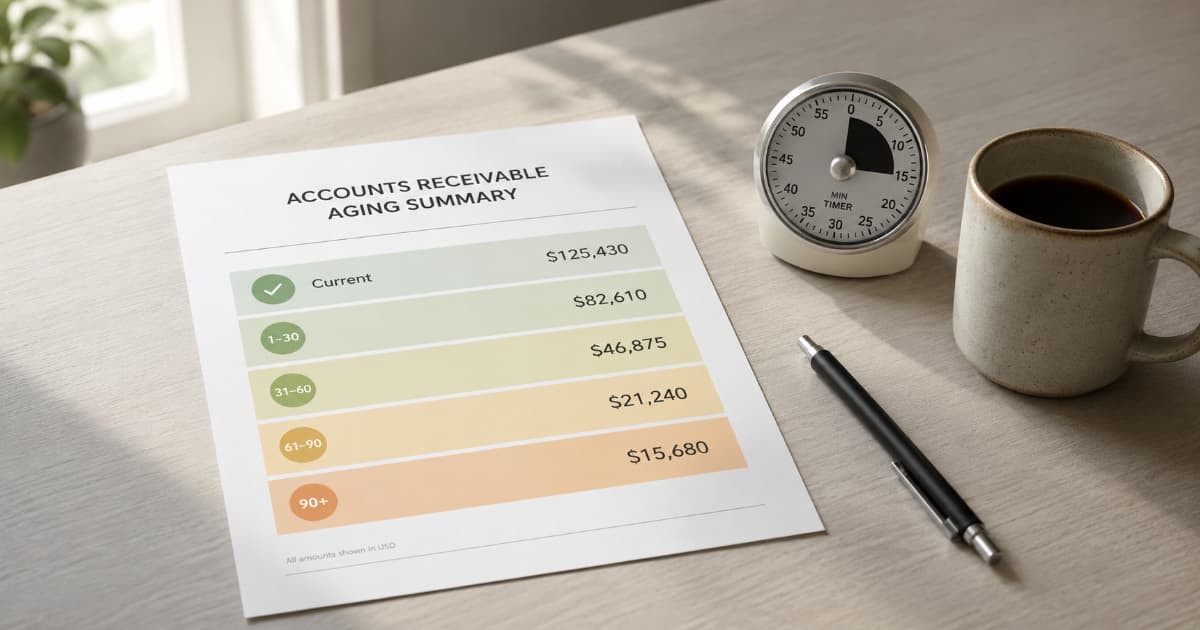
Aging Buckets: Sorting Invoices by Risk
Not all outstanding invoices carry the same risk. An invoice due yesterday is not the same as one 60 days overdue.
Aging buckets sort open invoices by how far past their due date they are, so you can see the risk profile at a glance.
Current (Not Yet Due)
These invoices are within their payment terms. A Net 30 invoice sent 12 days ago sits here.
Action: None required. Monitor normally.
1–30 Days Overdue
The invoice passed its due date within the last month. Most late payments land here: AP processing delays, casual oversights, or clients who pay on their own schedule regardless of your terms.
Action: Let automated reminders handle the first few days. If the amount is large, the client is new, or the invoice is more than a week overdue, send a personal note.
31–60 Days Overdue
Past the casual-oversight window. The client has held your money for a full month beyond agreed terms.
Action: Manual follow-up. A personal email or call works better than another automated nudge at this stage. Check your original payment terms to confirm the due date before escalating.
61–90 Days Overdue
Two months past due. Collection gets harder from here without escalation.
Action: Review your contract for late fee provisions. Send a formal demand or move to your escalation process.
90+ Days Overdue
At three months, many freelancers treat the invoice as high-risk and start weighing write-off, formal demand, or small claims. The invoice is still technically receivable, but collection without legal or formal action becomes increasingly unlikely.
Action: Weigh formal demand, small claims, or writing it off. At this point the decision is financial and legal, not relational.
Once you know which bucket each invoice falls into, the right next step is usually obvious. For the specific playbooks behind each action:
- How to Politely Ask for Payment (31–60 day follow-ups)
- Client Won't Pay? A Freelancer's Escalation Plan (61+ day escalation)
- When (and How) to Write Off an Unpaid Invoice (90+ day decisions)

The 15-Minute Weekly AR Review
Set a recurring 15-minute block once a week. Tuesday or Wednesday morning works well: early enough to act before the week disappears.
Here's the routine:
1. Update statuses (3 minutes). Mark invoices paid since your last review. Update notes on client communication or disputed amounts.
2. Scan the aging buckets (5 minutes). Sort your ledger by days overdue. How many invoices are current? How many crossed into the 1–30 bucket since last week? Is anything approaching 60 days?
3. Flag action items (3 minutes). For anything in the 31–60 bucket, schedule a personal follow-up. For anything approaching 90 days, escalate. For current invoices with large amounts, note the due date so a single late payment doesn't catch you off-guard.
4. Check concentration (2 minutes). Add up what each client owes across all open invoices. A practical rule of thumb: if one client represents roughly 40% or more of your total AR, that's a risk signal, track record or not. One delayed payment from that client affects nearly half your outstanding revenue.
5. Note patterns (2 minutes). Does one client consistently land in the 1–30 bucket? That's useful data for the next contract negotiation. Do corporate clients take longer than smaller ones? Adjust your expectations and terms. See How to Invoice Corporate Clients for AP-specific timing. If a reliable client keeps stretching Net 30 to Net 40+, an early-payment discount might accelerate them. See Early Payment Discounts for Freelancers for when that trade makes sense.
If everything is current and balanced, the review takes five minutes. If three invoices just crossed into overdue, you'll use the full fifteen. Either way, you know where your money is.
See every invoice status at a glance.
BillerBear tracks invoices from draft through sent, overdue, and paid, so your weekly AR review takes minutes.
Create a free invoice →Real Cash vs. At-Risk Cash
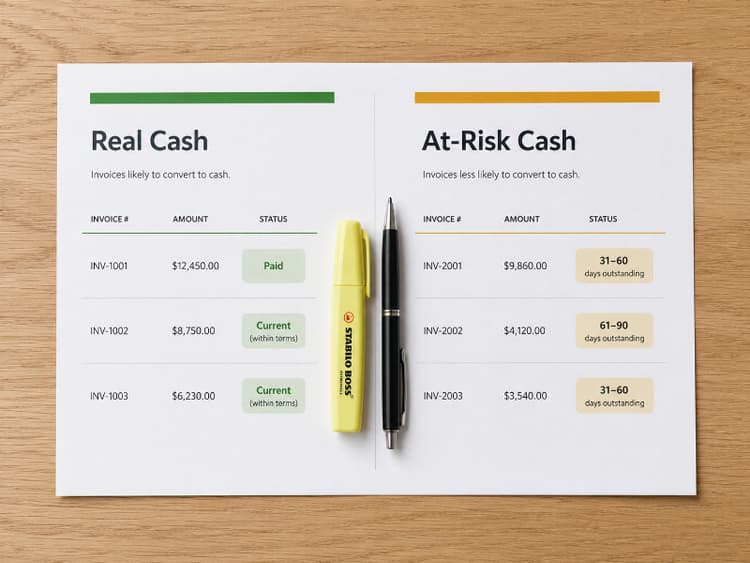
Once you're tracking aging, your AR ledger sorts into three categories:
Collected. Paid and deposited. This is your actual cash position.
Low risk. Current invoices within terms, or slightly overdue from clients with a clean payment history. You can plan around this money arriving, but don't spend it yet.
At risk. Anything 31+ days overdue, invoices from clients who haven't responded to reminders, or disputed amounts. Treat this as uncertain until you have payment confirmation or a clear commitment.
In many cash-basis accounting systems, income is recognized when payment is received, not when the invoice is sent. Rules vary by jurisdiction, so confirm with a tax professional. For planning purposes, though, how much of your outstanding AR is likely to convert matters more than the total.
Your cash flow forecast starts where your AR review ends. AR tells you what's owed right now. The forecast projects when it lands and what happens next. See Freelance Cash Flow Forecasting for the 90-day view.
What AR Tracking Reveals Over Time
The payoff isn't any single review. It's the patterns that show up over months.
You'll learn which clients pay early, which stretch terms, and which need personal follow-up every cycle. You'll notice seasonal patterns: maybe Q1 is slow because your biggest client's AP team runs on fiscal-year budget cycles. You'll spot early warning signs that a client relationship is souring before the conversation gets uncomfortable. See 5 Client Red Flags That Predict Payment Problems for the broader warning signs.
When tax season arrives, a clean AR ledger makes reconciliation straightforward. You'll know which invoices were paid in the tax year and which are still outstanding. Once invoices flip to paid, verify the deposits actually match. See How to Match Invoices to Bank Deposits for that workflow, and The Freelancer Tax Prep Checklist for the full annual routine.
Track What's Owed. Act Before It's Overdue.
Sending invoices is the easy part. Knowing what's outstanding, how long it's been sitting, and which clients need attention is what keeps freelance cash flow stable.
Fifteen minutes a week. One updated ledger. A clear split between what's real, what's likely, and what's at risk.
BillerBear tracks every invoice from draft through sent, overdue, and paid. Invoice statuses, payment dates, and client records give you the data to run a clean AR review without rebuilding it from scratch each week.
If you want the final handoff routine before an invoice lands in AR, see Freelance Project Closeout Checklist.
Ready to create clearer invoices?
Create up to 3 invoices per month free. No credit card required.
BillerBear Editorial
Continue reading
How to Match Invoices to Bank Deposits: A Freelancer Reconciliation Workflow
Paid invoices and bank deposits should match, but fees, batched payouts, and partial payments break the math. Here's a monthly workflow to close the gap.
Freelance Cash Flow Forecasting: A 90-Day Plan for Uneven Income
Build a simple 90-day cash flow forecast from your invoice pipeline so you can spot payment gaps early, plan around slow-paying clients, and stop reacting to uneven freelance income.
Quarterly Estimated Taxes for Freelancers: Calculate Payments From Paid Invoices
Learn when quarterly estimated tax payments are due, how to calculate what you owe using your paid invoices, and how to avoid underpayment penalties and April surprises.